


NOLA.com
3.9651.00 Reviews
App Specs
- Version
- 4.1.0
- Updated On
- License
- Free
- Downloads
- 100,000+
- Developer
- Georges Media (NOLA, The Advocate)
- Categories
- News & Magazines
- Platform
- Android
Screenshots

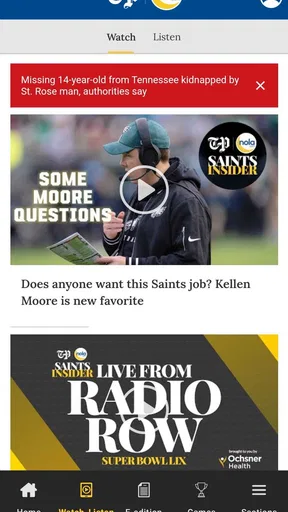

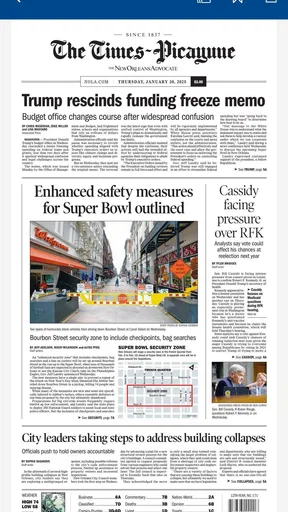
 Analysis by AppCompare
I’d choose NOLA.com when I want a closer, more locally grounded view of New Orleans than a national headlines feed can give me. Its value is not that it replaces every source of news; it’s that it keeps the city and surrounding area at the center. That focus makes it useful for residents, people with family nearby, and anyone who follows the region from a distance. The trade-off is straightforward: if local coverage is not what you’re looking for, a broader news app will serve you better.
A local lens is the main reason to install it
In a crowded news-and-magazines category, the most useful question is not whether an app has headlines, but whether its coverage matches the reader’s daily concerns. NOLA.com is built around New Orleans-area news, so it makes more sense as a companion to general news sources than as a complete replacement for them. I would open it to follow a local issue, check what is happening around the city, or get a regional perspective on a story that national outlets cover only briefly.
That distinction matters when you are deciding whether to keep it on your phone. A national aggregator can pull together stories from many places, but its broad scope may leave local developments less prominent. A newspaper’s mobile site can be a reasonable alternative if you only read occasionally; an app is more convenient when you want to make checking local coverage part of a routine. I’d use NOLA.com for that regular, regional check-in, then turn to other sources when I need wider national or international coverage.
How I’d fit it into an ordinary day
On a weekday morning, I might skim the headlines while having coffee, open one story that seems relevant to the day, and leave the rest for later. The app’s headline-and-image presentation suits that quick pass: it helps me decide what deserves attention without committing to a long reading session. If a local development could affect plans, I would read the full report rather than treating a headline as the whole story.
That is also a useful way to manage notifications. Alerts can bring breaking news to your attention without requiring you to repeatedly open the app, but I would keep them focused on what I genuinely need to know. Too many alerts can make local news feel like a constant interruption. A practical routine is to use notifications for urgent developments and do the broader browsing when you choose, rather than letting every update dictate when you look at your phone.
For someone who has moved away from New Orleans, the same routine can help maintain a connection to the area without trying to follow every post or conversation on social media. For a visitor, local coverage may add context to what is happening during a stay, though it is not a substitute for checking details directly when making time-sensitive plans. In both cases, the app is most useful when the reader has a real reason to care about the region.
What to keep in mind before relying on it
Local focus is a strength, but it is also a boundary. Readers seeking a balanced daily briefing across many cities, national politics, science, business, and world events may find a general-purpose news app more efficient. I would not expect a New Orleans-centered publication to take the place of several specialist sources. Instead, I see it as the source to add when local reporting is the gap in an otherwise broad reading mix.
Worth Reading Before You Choose

EA SPORTS FC Mobile 26 Is a Bigger Football Game, but It Takes Time

Flipboard Shows What News Apps Must Do Beyond the Feed

Switching to Android Auto Means Rethinking Your Driving Routine

Google Calendar Makes a Crowded Week Easier to Manage

Ludo King Makes the Most of the Minutes Between Plans

Baby Panda World Brings Quick Play to Modern Phones, but Its Game Library Feels Busy
It is worth approaching any single outlet with the same sensible habits: read beyond the headline, distinguish reporting from opinion, and compare coverage when a story is especially important to you. NOLA.com includes opinion pieces as well as articles, so paying attention to the kind of piece you are reading helps keep those formats clear. The app’s local perspective can make a story feel more immediate, but a strong personal connection is also a reason to seek context from more than one source.
Cost is another practical consideration. The app is free to install, while in-app purchases are listed at $19.99 per item. If you are considering a purchase, check what it offers and whether it fits your reading habits before committing. The app is rated for Teen audiences, a useful point for households deciding whether its material is appropriate for younger readers; parents may still want to review articles together because news topics can vary.
Who is likely to get the most from it?
I’d recommend NOLA.com most readily to people who live in the New Orleans area and want local coverage within easy reach. It also has a clear use for former residents, people with friends or relatives in the region, and readers who follow the city’s public life, culture, or sports. If your interest is occasional, you can simply open it when a local story catches your attention; if the area is part of your everyday life, a brief daily scan is likely to feel more worthwhile.
I would hesitate to recommend it as someone’s only news source if they need broad coverage from across the country and world. I would also suggest skipping it if you have no ongoing interest in New Orleans-area news: even a well-organized app cannot make a location-specific feed relevant when the subject itself does not matter to you. In that case, a wider news service is the more natural starting point.
The app’s place in a local news routine
Georges Media, the publisher behind NOLA.com and The Advocate, gives the app a clear regional identity. It has been available since February 18, 2011, and its current version is 4.1.0, with Android 8.0 as the minimum operating-system requirement. Those details make it easier to judge whether it fits your device and whether you are looking at an established local publication rather than a general news reader.
Its audience numbers suggest that it has a meaningful readership: NOLA.com has more than 100,000 installs, an average rating of 3.8 from around 2,100 ratings, and 652 written reviews. I would treat those figures as context, not as a guarantee that every reader will like the experience. What matters more is whether its local coverage is useful to you and whether the app fits comfortably into the way you already read news.
Before making it part of a daily habit, I’d try a simple test: browse a few headlines, open a story in an area you care about, and notice whether the reporting gives you enough context to keep reading. Then decide whether you want alerts or prefer to check in manually. This small trial helps answer the practical questions that a download page cannot settle for you: whether the local focus feels relevant, whether the reading experience suits your routine, and whether you would actually return to it.
So, I’ve been diving into the world of NOLA.com recently, and let me just say, it’s been quite the adventure. If you're a fan of New Orleans or just someone who loves staying updated with vibrant local news, then this app might just be your new best friend. Let’s explore what it has to offer.
Getting Started with NOLA.com
First things first, downloading NOLA.com is a breeze. Available on both Android and iOS, it’s just a quick search away in your app store. Once installed, you’re greeted with a sleek and user-friendly interface. The design is simple yet effective, making navigation intuitive even for those who aren’t super tech-savvy.
Upon opening the app, you’ll immediately notice how well-organized everything is. The main screen presents you with the latest headlines, and each article snippet is accompanied by a relevant image, giving you a quick visual preview. I found this especially handy for skimming through the news when I’m in a hurry.
Features That Stand Out
One of the coolest features I discovered is the customizable news feed. You can tailor it to your interests, whether you’re into politics, food, entertainment, or sports. This means you’re not bombarded with news you don’t care about, and it saves you a ton of time.
Another feature that deserves a shoutout is the notification system. I love how you can set alerts for breaking news. This is a game-changer for anyone who wants to stay in the loop without constantly checking their phone. Plus, the notifications are concise and to the point, which I really appreciate.
For those who enjoy a deeper dive into stories, NOLA.com offers in-depth articles and opinion pieces. These are well-written and provide a comprehensive view of the topics at hand. Plus, they often include interactive elements like polls and photo galleries, which makes for a more engaging reading experience.
User Experience and Interface
Let’s talk about the user experience because, honestly, it’s pretty impressive. The app is fast, with minimal loading times. This is crucial, especially when you’re on the go and need information quickly. The layout is clean, with a focus on readability. The font size is just right, and there’s plenty of white space, which makes reading news articles easy on the eyes.
I also appreciated the offline reading feature. It’s perfect for those times when you’re on a flight or in an area with spotty internet access. Just download the articles you’re interested in, and you can read them at your leisure without needing a connection.
Engaging with the Community
One aspect of NOLA.com that I found particularly engaging is the community interaction. Comments on articles allow for lively discussion, and it’s interesting to see different perspectives from fellow readers. It gives the app a social media-like feel, fostering a sense of community among users.
Additionally, the app features events and local happenings, which are great for planning your weekend or discovering new activities. Whether it’s a jazz festival or a new restaurant opening, the app keeps you informed about what’s going on in the city.
Final Thoughts
In summary, NOLA.com is more than just a news app; it’s a window into the vibrant life of New Orleans. With its easy navigation, personalized features, and engaging content, it offers a comprehensive news experience that’s hard to beat. Whether you’re a New Orleans local or a fan from afar, this app is a fantastic tool to stay connected with the Crescent City.
If you haven’t tried it yet, I’d say go for it. It’s free to download, so there’s really nothing to lose. Dive in, explore, and let NOLA.com bring a slice of New Orleans to your fingertips.
Pros
- User-friendly interface for easy navigation.
- Real-time news updates keep you informed.
- Customizable notifications for preferred topics.
- Comprehensive coverage of local events.
- Offline reading mode available.
Cons
- Ads can be intrusive for some users.
- Limited international news coverage.
- Requires account for personalized features.
- Occasional app crashes reported.
- Subscription required for premium content.
FAQs for NOLA.com
What is NOLA.com and what features does it offer?
NOLA.com is a comprehensive news app providing the latest updates and in-depth coverage of New Orleans and Louisiana. It offers features like breaking news alerts, detailed articles, live sports scores, weather updates, and multimedia content. Users can customize their news feed to focus on topics of interest, ensuring they stay informed about local events and stories.
Is NOLA.com free to use, or are there any subscription fees?
NOLA.com offers free access to a variety of content, but to enjoy an ad-free experience and access premium articles, users may need to subscribe. Subscription fees vary, and users are encouraged to check the app's latest pricing details. The free version still provides substantial content for casual readers.
How frequently is the content updated on NOLA.com?
Content on NOLA.com is updated regularly throughout the day, ensuring users receive the latest news as it happens. Breaking news alerts are sent out promptly, and the app is consistently refreshed with new articles, opinion pieces, and multimedia content so users can stay up to date with current events.
Can I customize my news feed on NOLA.com?
Yes, NOLA.com allows users to customize their news feed according to their interests. By selecting preferred topics such as local news, sports, culture, or politics, users can tailor their experience to focus on the content that matters most to them, ensuring a personalized and relevant news experience.
What platforms is NOLA.com available on, and how do I download it?
NOLA.com is available for both Android and iOS devices. Users can download the app from the Google Play Store for Android devices or the Apple App Store for iOS devices. Simply search for 'NOLA.com' in the respective app store, and follow the prompts to install the app on your device.


